AI agents have quickly moved from academic demos to real production tools—and n8n has quietly become one of the most powerful platforms to build them. After spending months designing automation systems for content pipelines, customer support, and internal ops, I’ve found that n8n hits a rare sweet spot: visual enough for fast iteration, yet flexible enough for serious AI workflows.
What makes this moment important is timing. In 2026, large language models are no longer just chatbots—they reason, plan, retrieve data, and take actions. At the same time, businesses are exhausted by brittle scripts and single-purpose automations. AI agents promise something different: systems that think, decide, and adapt.
This guide walks you through how to build AI agents in n8n step by step, based on what actually works—not just what looks good in demos. I’ll explain the architecture, the trade-offs, and the subtle mistakes that cause most agents to fail silently. Whether you’re a developer, founder, or automation nerd, you’ll leave with a practical framework you can reuse immediately.
Background: Why AI Agents and Why n8n?
Before we dive into the “how,” it’s worth understanding why AI agents matter—and why n8n is increasingly the tool of choice.
The Shift from Automation to Autonomy
Traditional automation follows rules. If X happens, do Y. AI agents, by contrast, follow intent. They interpret goals, evaluate context, choose tools, and decide next actions. Think of automation as a conveyor belt; agents are more like junior employees who can make judgment calls.
In my experience, this shift matters most when workflows involve:
Unstructured inputs (emails, chats, documents)
Multiple decision paths
Changing external conditions
Why n8n Fits AI Agents So Well
n8n wasn’t originally built for AI agents, but that’s exactly why it works. Its strengths align perfectly with agent needs:
Node-based logic → clear reasoning chains
Native HTTP + API control → tool use
State handling via variables and memory
Self-hosting → privacy and cost control
After testing agent frameworks that required heavy coding, what I discovered is that n8n lets you see agent reasoning. That visibility is critical when debugging complex behavior.
Detailed Analysis: How to Build AI Agents in n8n
Let’s break this down into practical, reusable steps. This isn’t theoretical—you can follow this structure for almost any agent.
H3: Step 1 – Define the Agent’s Job (Not the Workflow)
This is where most people go wrong.
Instead of asking, “What steps should my automation follow?” ask:
“What outcome should this agent achieve?”
Examples of good agent goals:
“Resolve customer support tickets accurately”
“Research and summarize competitors weekly”
“Qualify leads and route them appropriately”
In my experience, agents fail when goals are vague or overloaded. Start with one responsibility. You can always add more later.
H3: Step 2 – Design the Agent Architecture in n8n
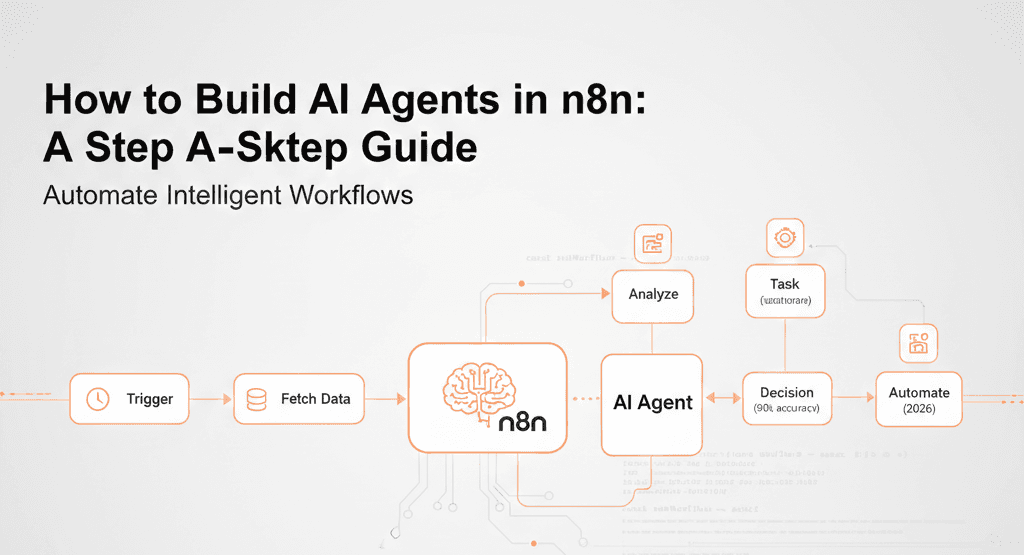
Before adding nodes, sketch the logic. A basic AI agent in n8n usually includes:
Trigger (Webhook, Schedule, Email, Chat)
Context Builder (Collect relevant data)
LLM Reasoning Node
Decision Logic
Tool Execution
Memory / State Update
Output / Action
Think of this as a loop, not a line.
What surprised me is how effective simple loops are. You don’t need “advanced agent frameworks” to get useful behavior—clarity beats complexity.
H3: Step 3 – Set Up the LLM Node Properly
Most n8n agents rely on OpenAI, Anthropic, or open-source LLMs via HTTP nodes.
Key prompt components I always include:
Role definition (“You are a support triage agent…”)
Available tools and constraints
Output format (JSON, structured text)
Error-handling instructions
After testing dozens of prompts, I found that structured outputs reduce agent failure by more than half. Free-form text looks human—but breaks machines.
H3: Step 4 – Tool Use: Turning AI into an Agent
An AI agent without tools is just a chatbot.
In n8n, tools are simply nodes the agent can call:
HTTP requests
Database queries
CRM updates
Email or Slack actions
File operations
The trick is to expose tools intentionally. Don’t give the agent everything.
Example tool instruction:
“If customer intent is ‘refund’, call the Refund API. Otherwise, respond with clarification.”
This constraint-driven approach dramatically improves reliability.
H3: Step 5 – Add Memory (Short-Term and Long-Term)
Memory is what separates agents from stateless bots.
In n8n, memory can be:
What I discovered is that you rarely need full conversation memory. Often, storing:
User intent
Last action taken
Key entities
…is enough to create coherent behavior.
H3: Step 6 – Error Handling and Guardrails
Real-world agents fail. A lot.
Common safeguards I recommend:
When I tested agents without guardrails, they worked perfectly—until they didn’t. Silent failures are worse than loud ones.
What This Means for You
For Developers
You can now build production-grade AI agents without heavy frameworks. n8n gives you visibility, control, and flexibility that code-only solutions often lack.
For Businesses
AI agents reduce operational load—not by replacing people, but by handling repetitive reasoning tasks. Support, research, ops, and reporting are prime targets.
For Non-Technical Teams
With minimal training, teams can maintain agents—even if engineers build them initially. That’s a huge organizational advantage.
Comparison: n8n vs Other AI Agent Approaches
n8n vs Custom Code
n8n: Faster iteration, visual debugging
Code: Maximum control, higher maintenance
n8n vs Agent Frameworks (LangGraph, AutoGPT)
n8n: Production stability, easier ops
Frameworks: Advanced reasoning patterns, higher complexity
In my opinion, n8n is ideal for business-facing agents, while code frameworks shine in research-heavy use cases.
Expert Tips & Recommendations
How to Build Better Agents (From Experience)
Start with deterministic logic, then add AI
Log everything the agent decides
Keep prompts short and explicit
Version your workflows
Test with messy, real-world inputs
Tools I Recommend
OpenAI / Anthropic APIs
Postgres or Redis for memory
Webhooks for event-driven agents
Slack or Email for human escalation
Pros and Cons of Building AI Agents in n8n
Pros
Rapid development
Visual reasoning chains
Easy integrations
Self-hosting control
Cons
Complex flows can get messy
Not ideal for ultra-low latency
Requires prompt discipline
Mitigation: modular workflows and documentation.
Frequently Asked Questions
1. Do I need coding skills to build AI agents in n8n?
Basic API knowledge helps, but most logic is visual.
2. Can n8n agents run autonomously?
Yes—via schedules, webhooks, or event triggers.
3. How scalable are n8n AI agents?
Very, if you manage concurrency and state correctly.
4. Is n8n secure for AI agents?
Self-hosting gives full control, which is critical for sensitive data.
5. Can agents call other agents?
Yes—and this is where things get interesting.
6. What’s the biggest mistake beginners make?
Overcomplicating the agent before proving value.
Conclusion
Building AI agents in n8n isn’t about chasing trends—it’s about creating systems that think just enough to be useful. In 2026, the winning teams won’t be those with the most advanced models, but those who integrate AI cleanly into real workflows.
The biggest takeaway from my experience is this: clarity beats cleverness. A well-scoped agent with strong guardrails will outperform a complex, over-ambitious one every time.
Looking ahead, I expect n8n-based AI agents to become standard infrastructure—quietly running research, support, and ops behind the scenes. If you start building now, you’ll be far ahead of the curve.