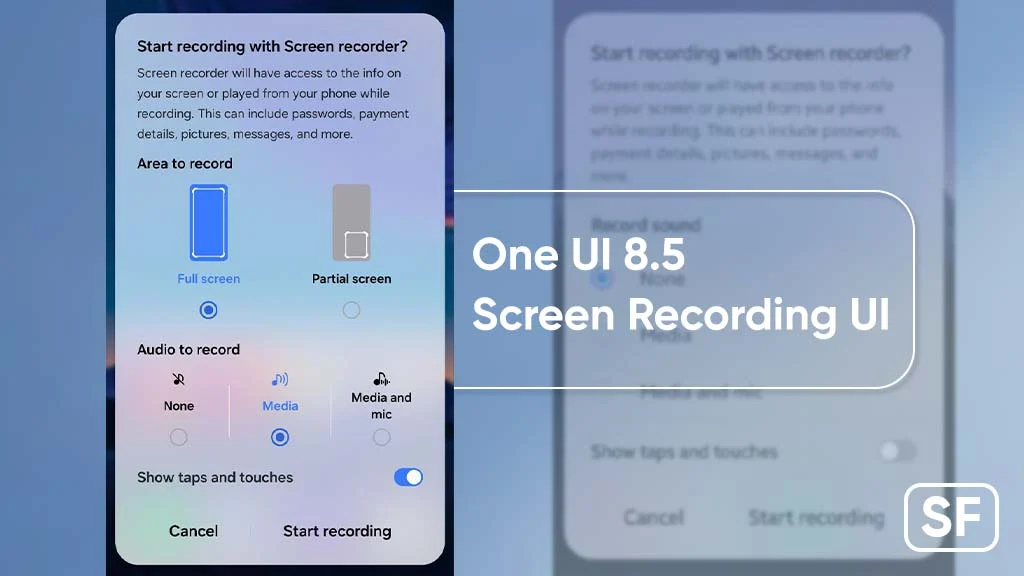
Samsung’s upcoming One UI 8.5 update is reimagining one of its most useful built-in tools — the Screen Recorder — with a bold new Glassmorphic design and refined usability enhancements. This design shift brings a fresh look and enhanced interaction to screen capture workflows, aligning with broader visual and UX trends in mobile interfaces.
Since its launch, One UI has built a reputation for blending functionality with visual refinement on Galaxy devices. With One UI 8.5, Samsung continues this legacy by applying modern design elements and thoughtful usability tweaks to everyday tools like the Screen Recorder.
What Is Glassmorphism and Why It Matters
Glassmorphism is a design style characterized by semi-transparent, frosted-glass-like surfaces, soft shadows, and layered UI elements that convey depth and elegance. This trend has gained popularity because it elevates user interfaces beyond flat design, offering a sense of dimensionality without sacrificing clarity.
In the context of One UI 8.5, the Screen Recorder’s Glassmorphic makeover brings a more premium aesthetic that feels cohesive with modern UI language while improving focus and clarity for users. The new design blends translucency, refined contrast, and subtle shadows to make recorder controls feel lighter, more accessible, and visually distinct.
What’s New in the Screen Recorder With One UI 8.5
The redesigned Screen Recorder in One UI 8.5 introduces several noteworthy updates that affect both form and function:
1. Refreshed Visual Interface
Samsung’s Glassmorphic style gives the recorder a sleek control panel with semi-transparent backdrops and refined visual layering. The recorder controls now appear more integrated with the content on screen, reducing visual clutter and improving aesthetics.
2. Improved Accessibility and Usability
One UI 8.5 places a stronger emphasis on ease of use. The Screen Recorder panel now features:
Larger, more intuitive icons
Clearer status indicators
Smart grouping of recording options
These refinements make it easier for users — from beginners to advanced creators — to start, pause, or end recordings without fumbling through menus.
3. Enhanced Recording Controls
Samsung has also streamlined control options, allowing users to switch between recording modes more quickly. Whether capturing video with or without audio, users can make adjustments on the fly without interrupting the recording flow.
4. Visual Feedback Improvements
Real-time visual feedback now includes smoother transition animations and more responsive UI cues. These subtle enhancements help users understand app behavior at a glance, improving confidence and reducing misclicks during time-sensitive recordings.
Why a Redesigned Screen Recorder Matters
In recent years, screen recording has grown from a niche feature to a core tool for communication, content creation, and productivity. Whether users are recording gameplay highlights, documenting app bugs, capturing tutorial walkthroughs, or recording video calls, screen recording has become essential.
By rethinking the Screen Recorder UI and usability, Samsung acknowledges how critical this tool has become for everyday mobile users. The Glassmorphic design not only aligns visually with contemporary trends but also supports better usability — something that matters for quick and repetitive tasks.
How One UI 8.5 Fits into Samsung’s Broader Vision
One UI 8.5 represents another step toward a more fluid and modern mobile experience across Samsung devices. Beyond the Screen Recorder, the overall update includes refinements to animations, system responsiveness, notification management, and multimedia handling.
The Glassmorphic design language suggests Samsung is prioritizing visual cleanliness, depth, and context in its interface approach — a direction that builds on previous One UI iterations but pushes further toward sophistication without sacrificing performance.
This design philosophy works well across different device categories, including flagship Galaxy phones, foldables, and tablets.
User Experience: What to Expect in Everyday Use
When One UI 8.5 arrives on eligible Galaxy devices, users should notice immediate improvements in how screen recordings feel and look:
More intuitive controls reduce learning curves for less experienced users.
Clearer icons and panels make recording options easier to find and manage.
Visually refined effects improve the overall impression of Samsung’s native tools.
Smarter feedback enables smoother workflows and fewer accidental inputs.
These updates make the Screen Recorder not just more modern in appearance, but more effective in supporting a wide range of tasks — from casual captures to polished content creation.
Comparison With Other UI Tools
While many mobile UIs offer screen recording features, Samsung’s One UI has traditionally provided one of the most polished and flexible implementations. The addition of a Glassmorphic design elevates this further, helping Samsung stand out against competition by blending aesthetics with functionality.
This is especially significant for creators who want tools that feel both powerful and visually pleasing — a combination that resonates deeply with today’s users who value style as much as capability.
Final Thoughts
The One UI 8.5 update rethinks the Screen Recorder through thoughtful design and practical usability improvements. By introducing Glassmorphism and enhanced controls, Samsung is not just refreshing a tool — it’s elevating the entire screen recording experience on Galaxy devices.
Whether users are creating content, capturing memories, or sharing insights, the redesigned Screen Recorder delivers a design and functionality upgrade that feels modern, intuitive, and genuinely useful.
As One UI continues to mature, features like this showcase how incremental refinements can make big differences in daily mobile interactions — turning everyday tools into powerful enablers of creativity and communication.